
Top-Rated Network Attached Storage (NAS) Solutions on Amazon
Why a NAS matters more than ever
One failed hard drive is all it takes to wipe out years of photos, documents, and creative work. Cloud services can help, but they come with trade-offs: recurring fees, changing terms of service, and the uncomfortable reality that “your” data lives on someone else’s infrastructure. Lose access to your account, miss a payment, or have a phone stolen, and those backups are no longer fully under your control.
A NAS (Network Attached Storage) is a small, always-on storage server that sits on the local network. It can run scheduled PC backups, sync folders between laptops, and automatically ingest photos and videos from iOS and Android using first-party apps from Synology, QNAP, ASUSTOR, and TerraMaster. On top of simple backup, modern NAS platforms can also act as private app servers for Plex, WordPress, photo galleries, download clients, and more, with web-based interfaces that are far easier to live with than rolling your own home server.
For this guide, the focus is on top-rated NAS enclosures that are currently sold on Amazon US, roughly between US$200 and US$600. These are not the cheapest boxes on the site; they are the models that repeatedly show up in “best NAS” and Plex-ready roundups and have the right mix of hardware, software, and long-term support.
1) Synology DiskStation DS224+ (2-Bay, Diskless) – Best overall home NAS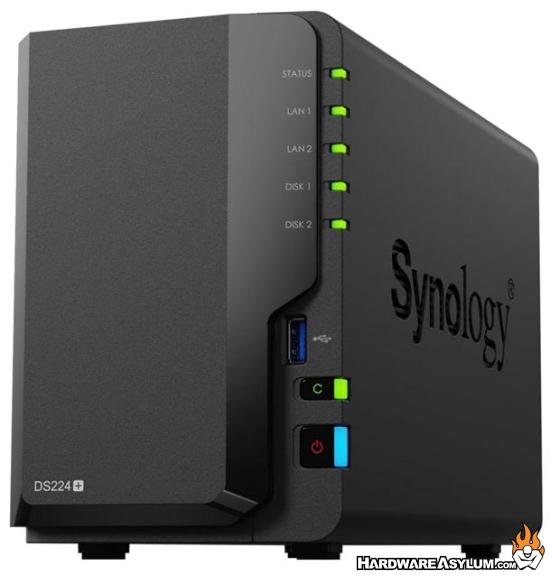
Why this pick
If you ask most people in the NAS space for a default home recommendation, DS224+ is what they mean. It’s a compact 2-bay system built around an Intel Celeron J4125 CPU and Synology’s DSM 7 operating system. Reviews and buying guides consistently call it one of the best all-around home NAS options thanks to its balance of performance, power efficiency, and software maturity.
DSM includes Synology Photos for phone-camera backup, Synology Drive for PC file sync, and Active Backup tools that can protect entire PCs, Macs, and even some cloud accounts. For a lot of households, this becomes the primary place where everything important eventually lands.
Key specs (high level)
- CPU: Intel Celeron J4125, 4-core 2.0–2.7 GHz
- Bays: 2 × 3.5"/2.5" SATA (diskless)
- RAM: 2 GB DDR4 (user-expandable to 6 GB)
- Network: 2 × 1 GbE with link aggregation
- Software: DSM 7 with packages for backups, Plex, Docker, photo management, surveillance, and more
Best for:
Users who want a “no drama” first NAS for centralized backups, photo archiving, and light media serving, with a very polished OS and strong vendor ecosystem.
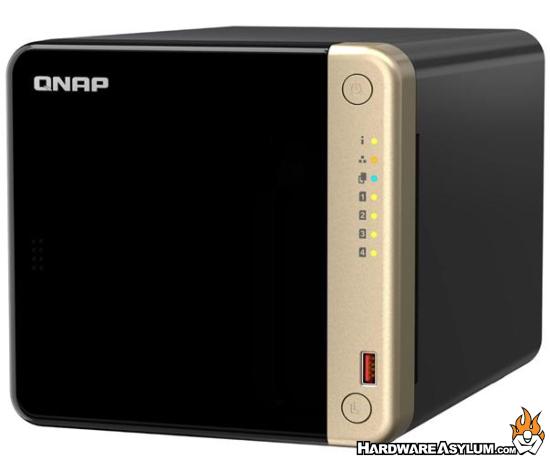
2) QNAP TS-464-8G-US (4-Bay, Diskless, 2.5GbE) – Power user / small office pick
Why this pick
TS-464-8G is the “do everything” 4-bay box for power users. It uses an Intel Celeron N5105/N5095 quad-core CPU with 8 GB DDR4 RAM, dual 2.5GbE ports, M.2 NVMe slots for SSD caching, and even HDMI 2.0 for direct-attach display options.
QNAP’s QTS OS targets more advanced users: it supports Plex, containers, virtual machines, snapshot-based backup, and a wide range of sync tools, while still behaving like a storage appliance rather than a DIY server. This is the pick that can start life as a basic backup box and grow into a small lab or Plex machine without feeling under-specced.
Key specs (high level)
- CPU: Intel Celeron N5105/N5095, 4-core (burst up to ~2.9 GHz)
- Bays: 4 × 3.5"/2.5" SATA (diskless)
- RAM: 8 GB DDR4 (expandable)
- Network: 2 × 2.5GbE (up to 5 Gbps aggregated)
- Expansion: 2 × M.2 NVMe slots, PCIe slot, HDMI 2.0
- Software: QTS with Plex, Qsync, Container Station, hybrid backup, and more
Best for:
Power users and small home/offices that want 4 bays, multi-gig networking, and room to experiment with Plex, containers, and light virtualization.
3) ASUSTOR AS5402T (2-Bay, Diskless, 2.5GbE + HDMI) – Media-centric 2-bay NAS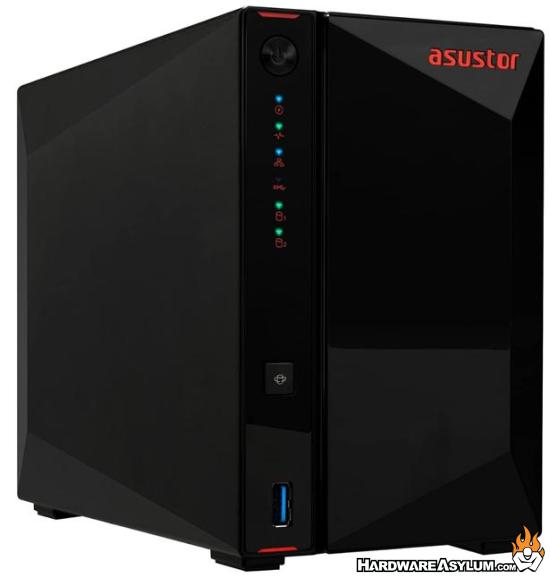
Why this pick
AS5402T is a modern 2-bay NAS that leans heavily into speed and media features. It uses an Intel Celeron N5105 CPU, includes dual 2.5GbE, four M.2 NVMe slots, three USB 3.2 Gen2 ports, and HDMI 2.0b for 4K output to a TV.
ASUSTOR’s ADM OS comes with a broad app store (Plex, Docker, backup tools, surveillance) and a suite of mobile apps like AiFoto and AiMaster that let owners initialize the NAS from a phone and push mobile photos/videos directly into private storage.
Key specs (high level)
- CPU: Intel Celeron N5105, quad-core 2.0 GHz
- Bays: 2 × 3.5"/2.5" SATA (diskless) + 4 × M.2 NVMe
- RAM: 4 GB DDR4 (up to 16 GB)
- Network: 2 × 2.5GbE; 3 × USB 3.2 Gen2
- Video: HDMI 2.0b with 4K support
- Software: ADM OS with App Central, media, backup, and container apps
Best for:
Users who want a compact but high-end 2-bay NAS that can back up devices and act as a serious Plex / media hub, including direct HDMI output to the living-room TV.
4) TerraMaster F4-423 (4-Bay, Diskless, 2.5GbE) – Value 4-bay multi-gig NAS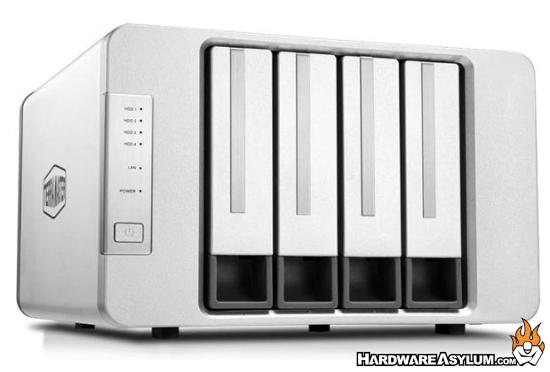
Why this pick
F4-423 is the value-driven 4-bay choice that still brings modern hardware. It uses an Intel Celeron N5095 quad-core CPU, comes with 4 GB DDR4 RAM (expandable to 32 GB), and includes dual 2.5GbE ports for faster network throughput when paired with a multi-gig switch or router.
TerraMaster’s TOS platform supports multiple backup schemes (Centralized Backup, Duple Backup, snapshots, CloudSync) and common media apps including Plex. Reviews often position the F4-423 as one of the most affordable “media-class” 4-bay NAS units on the market at around the US$500 mark.
Key specs (high level)
- CPU: Intel Celeron N5095, quad-core 2.0 GHz (burst higher)
- Bays: 4 × 3.5"/2.5" SATA (diskless)
- RAM: 4 GB DDR4 (expandable up to 32 GB)
- Network: 2 × 2.5GbE (up to 5 Gbps aggregated)
- Software: TOS with backup, snapshot, CloudSync, and media apps
Best for:
Buyers who want 4 bays, multi-gig networking, and aggressive pricing, and don’t mind a slightly more “enthusiast” OS compared to Synology.
Quick buying tips
- 2 bays vs. 4 bays
- 2-bay models (Synology DS224+, ASUSTOR AS5402T) are ideal for mirrored RAID1 plus optional SSD cache.
- 4-bay models (QNAP TS-464, TerraMaster F4-423) allow RAID5, higher total capacity, and mixing HDDs with SSDs for caching.
- Network speed
- DS224+ sticks with dual 1 GbE, which is fine for backups and light streaming.
- The other three all step up to dual 2.5GbE, which is worth it if there’s already (or soon will be) a 2.5GbE router/switch at home or in a small office.
- Mobile device backup
- Synology Photos / Drive, QNAP’s Qfile/Qsync, ASUSTOR’s AiFoto, and TerraMaster’s TNAS Mobile all support backing up photos and videos from phones directly to the NAS — perfect for the “protect your mobile memories without trusting a third-party cloud” story.
- Drives to pair with these
- All four are diskless enclosures. For most home users, NAS-rated HDDs such as Seagate IronWolf or WD Red Plus in the 4–8 TB range per drive hit a good balance of cost, performance, and reliability.
Final thoughts
From a “data insurance” perspective, a good NAS is simply a quiet guardian in the background, taking care of backups for PCs and phones without the privacy trade-offs and long-term uncertainty of a pure cloud strategy. In this lineup, Synology’s DS224+ naturally serves as the baseline recommendation: a user-friendly first NAS that makes centralizing backups and photo libraries feel approachable rather than intimidating. QNAP’s TS-464-8G-US then steps in for power users and small offices that want four bays, 2.5GbE, and the headroom to layer on Plex, containers, and more demanding workloads over time. ASUSTOR’s AS5402T leans into the media angle with HDMI, multi-gig networking, and strong app support, making it especially appealing as a living-room or creator-focused NAS that can double as a media hub. TerraMaster’s F4-423 rounds out the group as the value-driven 4-bay multi-gig option, offering plenty of capacity and speed at a more aggressive price point for buyers who are comfortable with a slightly more enthusiast-oriented interface. Taken together, these four systems give Amazon shoppers a clear short list: decide how many bays are really needed, whether multi-gig and HDMI matter, and then use the ASINs and links to confirm the current price and availability before committing to the box that will safeguard their data for the next several years.