
Tech News
-
2012 Budget Mini-ITX Desktop PC System Build Guide @ Legit Reviews
Published: Wednesday, December 19, 2012 | By: DennisWe all love system guides. They outline what gear you need and in some cases show you how it all goes together. Legit Reviews has a MiniITX system guide up using an interesting combination of parts, most of which are from Asus.
Imagine that?

Are you looking to build a new PC and thinking about using the Mini-ITX platform? Today, Legit Reviews shows you how to create a SFF system and stay under the $650 price point. The system uses an Intel Ivy Bridge processor, a Kingston 120GB SSD, and an ASUS GeForce GTX 650 video card just to highlight a few of the main components. This system should be able to easily tackle normal usage scenarios during the work week and then switch roles to a nice gaming machine on the weekends. Read on to check out the build!
There are several ways to go when building a MiniITX system and the decision normally comes down to your chassis choice and how powerful you want things to be. The Bitfenix Prodify used in the Legit built is a really nice case but quite tall (for what it is) and limits where you can physically put the case. Now if you used a chassis like the Silverstone Sugo SG08 then you can have full length video card support, great cooling AND still be able to put the system on a shelf and out of the way.
-
GIGABYTE GeForce GTX 650 Ti 1GB Review @ Techgage
Published: Tuesday, December 18, 2012 | By: Dennisthe nVidia GTX 650 Ti is such a great card that I almost feel bad saying you should use it as a dedicated PhysX processor, especially if you already have a great GPU setup.
Be sure to check out our GTX 650Ti 3-way roundup for more details.
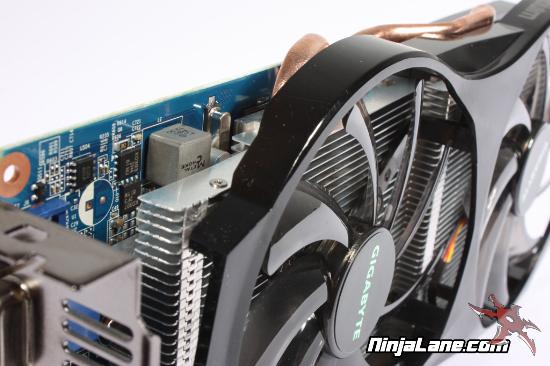
NVIDIA does such a great job filling holes in its product line-ups, that sometimes it manages to fill a void we didn’t even know existed. The GTX 650 Ti is a perfect example of this. This GK106-based card sits close to the GTX 660, and with GIGABYTE’s overclocked GV-N65TOC-1GI, we’ll see if we can close the gap even further.
I was fortunate enough to get overclocked samples from Gigabyte and can honestly say, clock for clock, they are faster across the board. Of course, assuming those clocks are higher than stock and faster than the competition, for which they are.
-
Cisco Shopping Around the Linksys Division
Published: Monday, December 17, 2012 | By: DennisBack in 2003 Cisco bought Linksys as a way to better their market position and finally break into the mainstream. For the most part it worked but, as with most corporate take-overs, the parent company alienated the established user base by making it difficult to support older "legacy" devices. (corporate agenda getting in the way)
For instance, say you needed a driver for a Linksys network card. Normally you would visit the website, click support or products and download the driver you needed. The only problem was, since your network card wasn't a router or network switch it was no longer supported. I guess that is one way to obsolete the legacy of the company you paid 500 Million for.
The unit may attract the interest of TV set makers seeking a recognized brand and technology, said the people, who asked not to be identified because the process isn’t public. Linksys is likely to fetch much less than the $500 million Cisco paid for it in 2003 because it is a mature consumer business with low margins, the people said.
Cisco wants to sell Linksys as part of its strategy to exit consumer businesses while expanding in corporate software and technology services. Chief Executive Officer John Chambers eliminated 7,800 jobs over the past year and closed businesses such as the Flip video-camera unit amid a slowdown in sales growth after a foray into consumer technologies backfired.Most large tech corporations have found money in corporate software and services due to the low overhead and high profit margins. IBM made the switch already and HP tried to change over but decided their legacy in hardware was too difficult to abandon. It is only a matter of time before Cisco makes the leap, and with any luck will be stuck dissolving Linksys because I doubt anyone will want to buy it.
-
NL: Review Block - Cases and Coolers
Published: Monday, December 17, 2012 | By: DennisWelcome to another episode of "Cases and Coolers" In this round we will be looking at six reviews from around the inbox including a couple from some friends of mine.
Cases
- Cooler Master Storm Stryker @ LanOC Reviews
- Corsair Carbide 200R Case Review @ Hardware Canucks
- Cooler Master HAF-XM Case Review on Technic3D
Coolers
- Cooler Master TPC 812 CPU Cooler Review @ ThinkComputers
- Corsair H55 Quiet Liquid CPU Cooler Review @ Hi Tech Legion
- Noctua NH-L9i Low Profile Heatsink Review @ OCmodshopJust my $0.02 the Corsair H55 could use a better fan and the Noctua NH-L9I isn an amazingly small cooler, just don't consider it to be your average OEM replacement.
-
KingFast F3 PLUS 120GB KF2510MCF SATA 3 MLC SSD Review @ ModSynergy
Published: Monday, December 17, 2012 | By: DennisThe SSD has become the de-facto standard for high speed storage in recent years and has also become the epitome for unstable data storage. While there is no easy way to tell what drive will be the best for your prized data or the fastest for Windows 8 you can rest easy knowing that most drives are still described by a long string of numbers.
Sporting 120GB of Intel MLC NAND flash memory while making use of the SandForce SF-2281 controller, read on to know more about the KingFast brand, and what you can expect from their KF2510MCF. With a 3-year warranty, see why it became one of the fastest SSD's we've ever reviewed with the latest fixed SandForce firmware version 5.0.4
Of course I didn't mean to scare you away from using SSD drives, they are quite fast and some are even stable but, if my ramblings prompted you to start a nighly backup to a solid rotational drive then, I have done good.
As for the KingFast, check out the review and see what they think of it.
-
US refuses to sign UN Internet regulations - Good Job!
Published: Friday, December 14, 2012 | By: DennisThis is pretty good news showing that the US ambassadors are paying attention.
The United States will refuse to sign a U.N. resolution calling for regulation of the Internet despite the measure winning the support of other countries participating in a summit on the issue, the American ambassador to the summit said Thursday.
“The U.S. today has announced that it cannot sign the revised regulations in their current form,” Ambassador Terry Kramer said in a conference call, adding that support for the resolution from other countries “looks strong enough that it looks unlikely that it will materially change.”
He added that the resolution will not force the U.S. to abide by the regulations.
“The resolution doesn't have teeth to it. ... At the end of the day, these (agreements) are not legally binding. ... They are much more normative and values-oriented.”The interesting thing about this is that the UN regulations are "values based" leading me to believe that the rest of the world feels that people in the United States have no values. Of course I can only speak for myself in saying that I feel I have good moral values but also seen 1000's more who seem to lack in the basics.
I say no to a regulated Internet and any attempt to take that away should be fought to the bitter end even if that does mean that other countries to create their own internets, just more bandwidth for us.
-
NL: Review Block: Power Supplies and Oblivious Ranting
Published: Thursday, December 13, 2012 | By: DennisI like HardOCP and really enjoyed what they did for the hardware review world back in the early days. In fact, [H] was one reason I got into doing hardware reviews in the first place but when you get an email from them starting with "didn't want to send us a review sample" you know things are going to get ugly.
Some of the famous Hard|OCP rips include a Matrox triple head graphics card and the Foxconn Bloodrage. Both of which were samples [H] had to buy and thus changed their view (Bias maybe?) . Well in this rip the [H] reviewer is looking at the EVGA SuperNOVA NEX1500 Classified Power Supply and while they do a fair assessment of the device they are totally oblivious of the target market for the PSU and don't even mention some of the test bench specific features.
EVGA did not want to send us one of its 1500W PSU beasts to review, so we went out and bought the $450 behemoth so we could put it through the HardOCP PSU grinder. EVGA clearly states that NEX1500 PSU is all about "no compromises," but we suggest that compromises are exactly what you will be making; more than a few too.
EVGA SuperNOVA NEX1500 Classified Power Supply Review @ [H]
Here are some other PSU reviews from around the interwebs
- Rosewill Tachyon 750 W Power Supply Review @ Hardware Secrets
- Rosewill Fortress 750W Power Supply Review @ Pro-Clockers
- Be Quiet! Dark Power Pro 10 650W PSU Review @ Legit Reviews
- Seasonic X-Series KM3 650 W Power Supply Review @ Hardware Secrets
- Corsair AX860 Power Supply Review @ HardwareHeaven
- Corsair AX760 Power Supply Review @ Hardware SecretsKeep your webbytubes glued to station "omg this review is crazy" cause we got more to come.
-
For all the id software fans- How I rage quit RAGE - 12/12/12
Published: Wednesday, December 12, 2012 | By: DennisThe big news of the day is the date; December 12th 2012. This will be the last repeating date that any of us will see in our lifetime. In fact the next time this will happen is shortly after the odometer flips sometime after the events that happen in the id game RAGE.
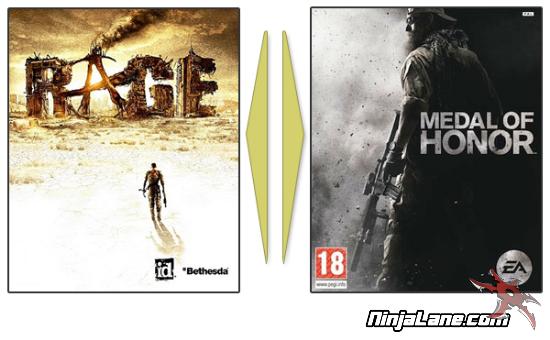
Speaking of RAGE I have to admit the game looks pretty nice and feels like an id title combined with a little bit of Skyrim and a failed integration with Borderlands 2. I am sad to say that after two hours of playing RAGE I am ready to shelve the game and move on with my life. Don't get me wrong I love the FPS aspect, the graphics look amazing (*I drooled over the shotgun detail) and the shooting mechanics are spot on. The thing I hate about RAGE is the "on rails" aspect of the maps and inability to drive with the mouse. Those things combined really have me at a loss when coming up for a reason to continue playing.
I mean, don't get me wrong but, if I wanted to play Metal of Honor: Operation Anaconda I would fire that game up and at least feel good about playing a triple A console title on the PC.
We all know the game RAGE was a tech demo to show off the latest megatexture implementation and get game developers "wet" to use their new gaming engine. But without PhysX or DirectX 11do you really think game studios will get in line to use the id Tech 5 engine? -
How to build a tiny Arcade Cabinet based on a classic Nintendo hardware at Metku.net
Published: Tuesday, December 11, 2012 | By: DennisI do love checking out the Metku mods, high quality, low prices and no questions asked.
We just finished our latest modding article. This time we document a project on how
to build a tiny arcade cabined based on Nintendo's technology...
From the article:
"Classic hand-held gaming devices near to your heart? Take a look at this project where I combine one of the real classics with another arcade icon."Check out the mod and let us know what you think.
-
EVGA GeForce GTX 670 FTW LE 2GB Video Card Review @ circuitREMIX
Published: Tuesday, December 11, 2012 | By: DennisThe GTX 670 is one of the best video cards money can buy, its as fast as a GTX 680 and supports 4-way SLI even long after the girls have gone to sleep.
The video card from EVGA we're looking at today is the GeForce GTX 670 FTW LE 2GB. To easily understand where it fits in EVGA's lineup, it their entry level non-reference design offering that's one step higher than the basic reference design. With the term FTW (for the win) in it's name, you'd probably assume that this is one of EVGA's higher end cards. You would be semi-right, as the FTW (and FTW SIG2) version are EVGA's top 2GB GTX 670 products. It's the LE suffix that denotes the lower end of the scale. To me, FTW LE is an oxymoron.
Dare I say the above statement was quite bold, LE is the Light Edition (don't quote me on that) meaing its hotclocked and ready to rock. EVGA could have dropped the FTW leaving LE but that makes even less sense.
Bottom line is, who cares?? The people buying this product either know what they want or have been told what they want and have settled on picking the cheapest one. Either way the name makes little difference.
What is important, is the 4-way.