
After careful consideration I have decided to transfer all hardware review activities to a new domain. I purchased Hardwareasylum.com in 2012 and have been working hard to build a new and improved Ninjalane on that domain. If you are reading this you have reached one of the archived articles, news, projects and/or reviews that were left behind during the site migration.
Please update your bookmarks and be sure to visit the new and improved Ninjalane at Hardwareasylum.com
EVGA GeForce GTX550 Ti FBP Video Card Review and SLI Performance
Author: Will West
Published: Friday, March 25, 2011


GTX550 Ti SLI Setup
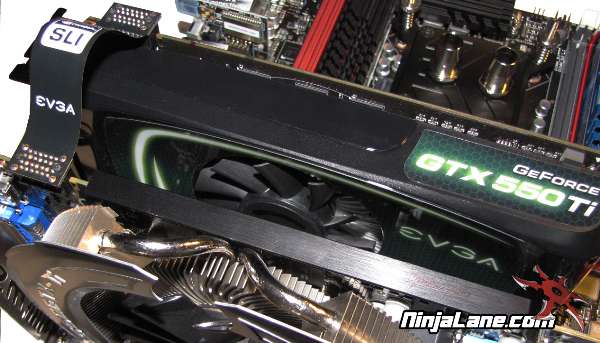
Setting up an SLI system is extremely easy and with a few simple steps you can have two cards running in tandom to enhance your 3D gameplay.
The first step is to have more than one of the same graphic cards. The cards you choose need to have the same GPU but no longer need to be completely identical. SLI configurations will be limited by the bridge connector across the top of the card. If you have a single connector you can run up to 2 cards in SLI, cards with more than one connector allow you to link up to 4 cards on supported motherboards.
Next you will need a motherboard with multiple 16x PCI-Express slots and spacing to support your graphic cards. If you have dual slot GPU coolers then you will need at least one open slot below the 16x connector. You will also want to make sure you motherboard is certified to run SLI since that will be the only limitation on most modern motherboards.
After the cards have been installed, simply attach the bridge connector and hook up the power leads. Your power supply is extremely important not only for performance of your system but longevity of your cards.
The first step is to have more than one of the same graphic cards. The cards you choose need to have the same GPU but no longer need to be completely identical. SLI configurations will be limited by the bridge connector across the top of the card. If you have a single connector you can run up to 2 cards in SLI, cards with more than one connector allow you to link up to 4 cards on supported motherboards.
Next you will need a motherboard with multiple 16x PCI-Express slots and spacing to support your graphic cards. If you have dual slot GPU coolers then you will need at least one open slot below the 16x connector. You will also want to make sure you motherboard is certified to run SLI since that will be the only limitation on most modern motherboards.
After the cards have been installed, simply attach the bridge connector and hook up the power leads. Your power supply is extremely important not only for performance of your system but longevity of your cards.
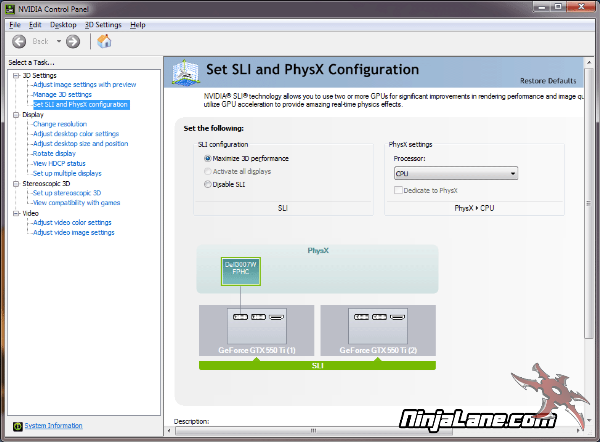
The final step is to enable SLI using the NVidia ForceWare Control Panel, from here you'll be able to enable or disable SLI, configure PhysX dedication and even tweak 3D settings.
To get the most out of a single display with multiple graphic cards select "Maximize 3D performance" and press apply. After a quick reboot you'll be up and running.
To get the most out of a single display with multiple graphic cards select "Maximize 3D performance" and press apply. After a quick reboot you'll be up and running.